Help center / Connecting your PMS
Connect & manage Cloudbeds
Sign up, connect Cloudbeds, what the integration does, its limits, and how to disconnect.
For operators · 5 min read
Staklio adds branded owner portals, automatic room rotation, fair revenue balancing and monthly settlements on top of Cloudbeds. This article covers everything you need to sign up, connect Cloudbeds, use the integration, and disconnect.
How to sign up for Staklio
Create your account
- 1 Go to staklio.com and click “Start free trial” (or open staklio.com/signup)
- 2 Enter your name, work email, company name and a password. No credit card is required — the trial runs for 14 days.
- 3 Confirm your email via the activation link we send you.
- 4 Sign in. Staklio asks you to connect your PMS first — everything else follows from the data it brings in.
How to connect Cloudbeds for the first time
Cloudbeds connects over OAuth 2.0. The quickest path uses Staklio's shared Cloudbeds app — you never handle API keys.
Shared connection (recommended)
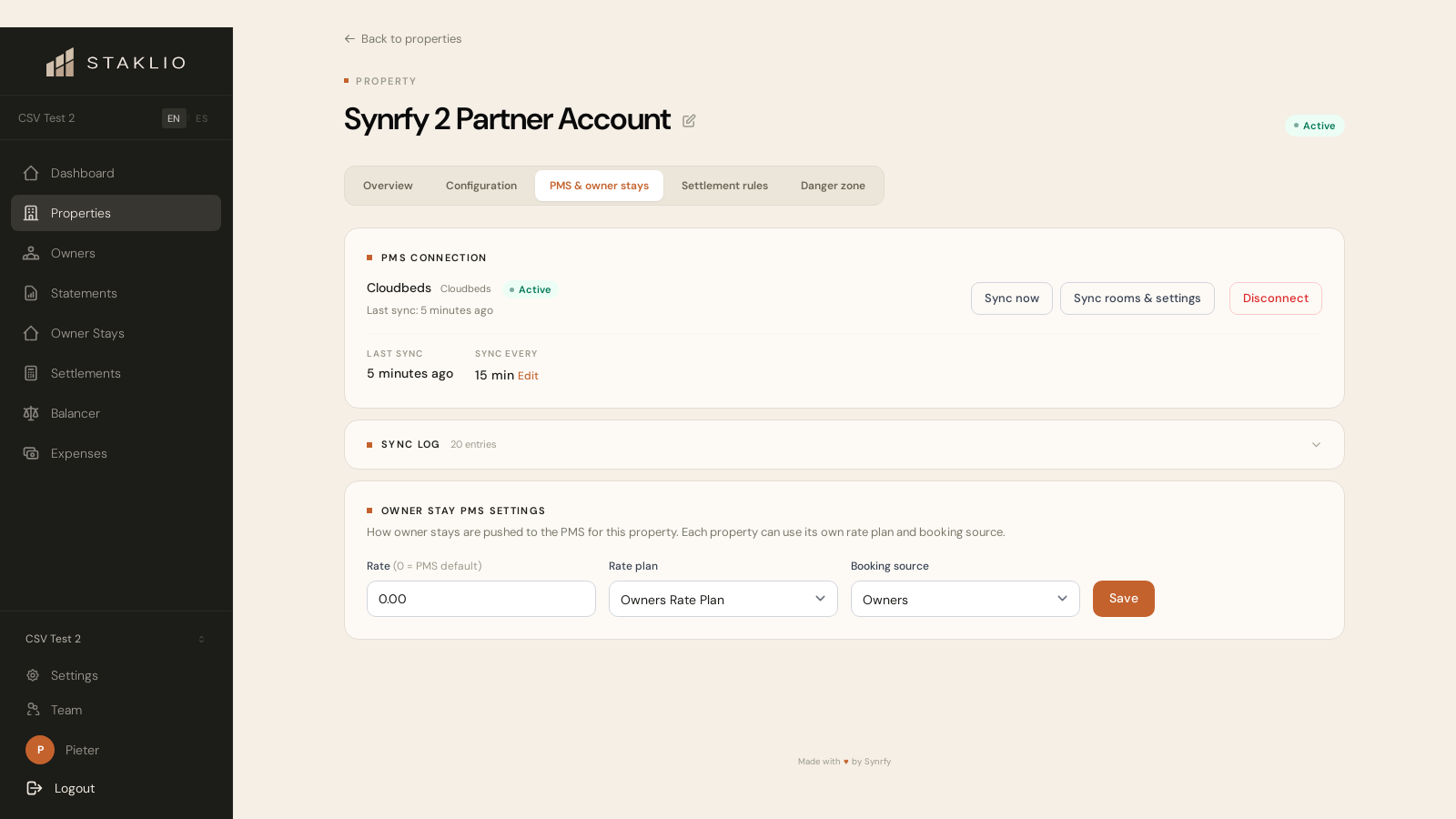
- 1 In Staklio, open the property and find the PMS connection card.
- 2 Choose Cloudbeds and click Connect.
- 3 You're sent to Cloudbeds — sign in and authorise Staklio for the property you want to sync.
- 4 Back in Staklio, confirm the property on the confirmation screen.
- 5 The first sync imports your room types, units and recent reservations. After that, Staklio re-syncs automatically about every 15 minutes.
Start from the Cloudbeds Marketplace instead
- 1 In Cloudbeds, open the Account menu and choose Apps & Marketplace. (If you don't see it, ask your Property Owner to enable the Marketplace permission for your user role.)
- 2 Search for Staklio and click Learn More to open the app page.
- 3 Click Connect App.
- 4 On the Application Authorization page, review the permissions Staklio asks for and click Allow Access. If you're signed in as an organisation-level user, pick the property you want to connect from the dropdown first — Staklio connects one property at a time, so repeat this for each property and leave about two minutes between them.
- 5 You're sent to Staklio. Sign in — or create your account if you don't have one yet — and the connection is attached to it automatically.
- 6 Confirm the property on the confirmation screen. The first sync starts immediately.
What the integration does
Specific functionality
- •Imports your Cloudbeds room types, physical units and reservations, and keeps them in sync (about every 15 minutes).
- •Classifies each reservation — owner stay vs guest booking — so owner stays are excluded from owner-payable revenue.
- •Automatic room rotation: incoming reservations can be routed to the right owner on intake (Auto), or proposed for your approval (Suggest).
- •Revenue balancing: re-assigns future, swappable reservations between equivalent units to keep earnings fair across owners — and writes the move back to Cloudbeds.
- •Creates owner stays and routed moves directly in Cloudbeds (with the room assigned), and can cancel reservations.
- •Generates monthly owner statements and settlements from the synced revenue.
- •Gives each owner a branded portal: bookings, live revenue, statements and their stay calendar, 24/7.
Limitations
Good to know
- •Revenue is taken from reservation room rates, not from Cloudbeds' accounting ledger. Staklio does not ingest posted financial transactions, taxes/fees by code, or run trust-accounting reconciliation.
- •When Staklio creates a booking it never transfers cards or processes payments — that stays in Cloudbeds.
- •Existing reservation dates can't be changed from Staklio (you can re-assign the room and add notes).
- •Group accounts: one Cloudbeds property is synced per Staklio property. Multi-property Cloudbeds group accounts are not synced as a single group.
How to disconnect
Disconnect on the Staklio side
- 1 Open the property's PMS connection (Settings › PMS, or the connection card).
- 2 Click Disconnect and confirm.
- 3 Syncing stops immediately. Your existing units, reservations, owners, contracts and settlements stay intact — nothing is deleted. You can reconnect at any time.
What disconnect does on our side: Staklio clears the stored Cloudbeds access and refresh tokens, marks the connection disconnected, and stops all further syncs and writes to Cloudbeds. As a courtesy it also asks Cloudbeds to revoke the token. To fully remove Staklio's access on the Cloudbeds side as well, remove the app inside Cloudbeds (see the Cloudbeds article linked below).
How to get support
Email [email protected] or use the contact form on staklio.com/support. We're happy to help with connecting, syncing, owner setup or anything else.
Will disconnecting delete my data?
No. Disconnecting only stops syncing and clears the connection tokens. Units, reservations, owners, contracts and settlements remain in Staklio.
Do I need to reconnect when tokens expire?
No. Staklio refreshes Cloudbeds tokens automatically before they expire.
How often does Staklio sync with Cloudbeds?
Automatically about every 15 minutes. You can also trigger a manual sync from the PMS connection page.
Does Staklio support Cloudbeds group accounts?
Staklio syncs one Cloudbeds property per Staklio property; it does not sync a multi-property group account as a single group.